 Delorion
userXpress documentation
Get started with SAP account and role administration: connect clients, find accounts and choose a task.
Applies to userXpress 2.0.0.0
Download PDF
- This pageuserXpress documentation
- This sectionGet started
- Full manualuserXpress documentation
On this page
Use userXpress to create accounts, manage passwords and assign roles across SAP systems and clients. The shared workspace lets you find accounts in several clients and select them for the same administration task.
For installation, workstation requirements and SAP access, start with the Technical Documentation.
Start here
On first use, complete First start and license. On later starts, open userXpress from the Windows Start menu, enter your passphrase and choose Unlock. Saved AutoStart connections open automatically when AutoStart is on.
- To connect another client, choose Add in Control Panel → Connected Systems and enter the SAP logon details. Your SAP account needs authorization for the tasks you will perform.
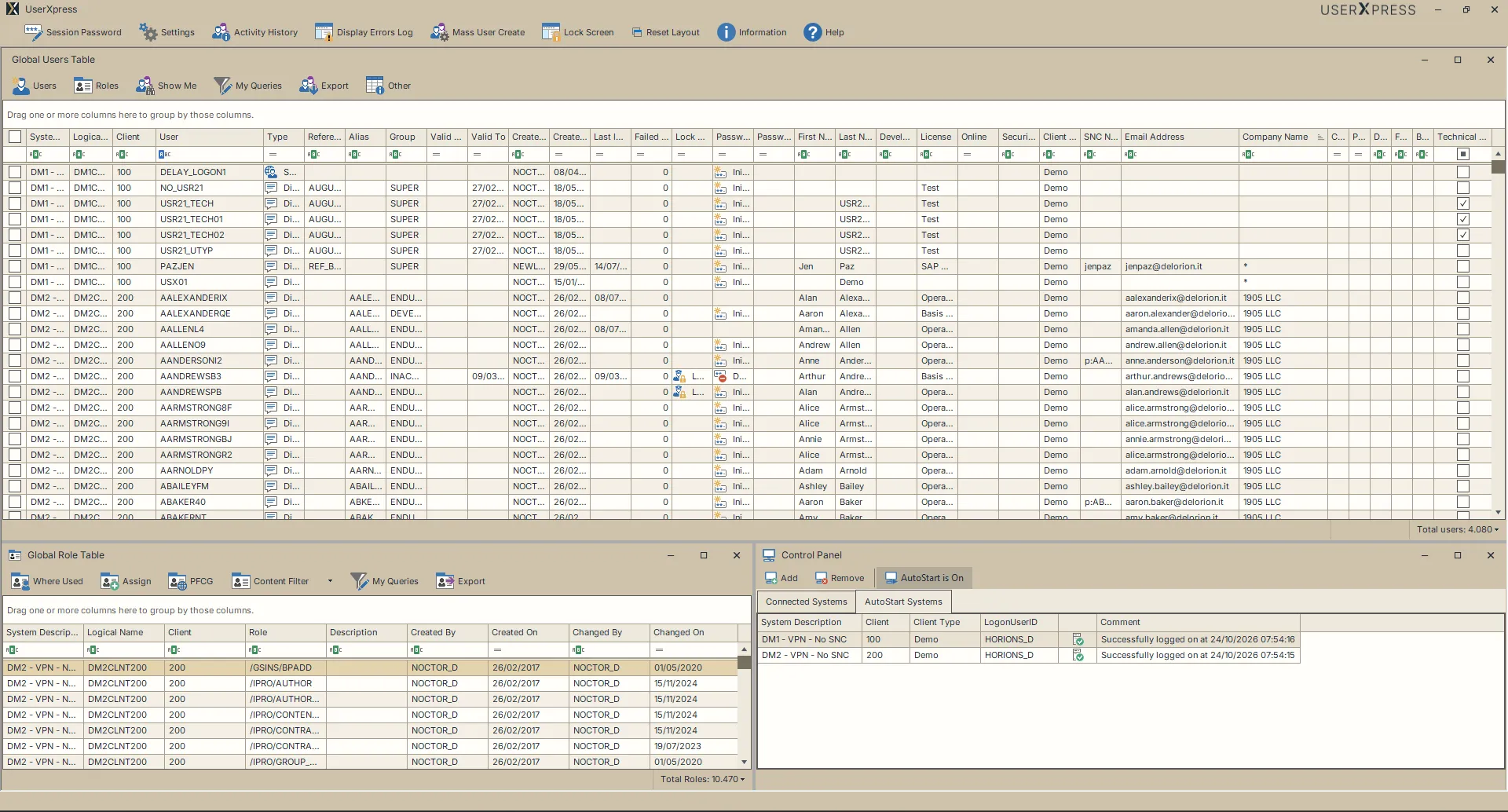
- In the Global User Table, enter the user ID in the filter row beneath User. Add a Client filter to narrow the list to one client. The table shows the matching accounts from the loaded data.
- Select the accounts for your task using their row checkboxes. Each row identifies a specific system, client and user ID.
- Open the task you need from the grouped table menus or follow its guide below. For example, set an initial password when a user needs a new password to sign in.
Find and select users explains additional filters, range selection and exporting the resulting list. For saved filters and conditions such as “client 100 and either surname Smith or Jones,” see My Queries.
Understand the workspace
The three main windows have different starting points:
- Control Panel: choose the SAP clients to connect, save regular connections for AutoStart and disconnect clients when finished.
- Global User Table: start with accounts to change their details, passwords, assignments or sessions.
- Global Role Table: start with roles to find their assigned users, inspect their content or assign them to accounts. Roles load when role management is enabled.
An account belongs to one system and client. For example, DEMO_USER in client 100 and DEMO_USER in client 200 are separate accounts. Select both rows when the task should affect both accounts.
A filter narrows the rows you see. Row checkboxes select the accounts for account actions. Table Export uses the filtered list, including unchecked rows. Each task guide explains its selection scope.
Arrange the windows
Use Reset Layout on the main toolbar to choose the workspace for your task:
- Default shows the Global User Table above the Global Role Table and Control Panel.
- User maximizes the Global User Table and minimizes the other two windows.
- Role maximizes the Global Role Table and minimizes the other two windows.
Choose Reset Layout → Default to bring all three windows back into view.
Choose the right task
- Restore access: unlock an account or manage its password.
- Create accounts: enter a new user’s details or copy an existing account.
- Create a batch: use an account list to copy each account from a source user, or Mass User Create when a spreadsheet defines account details, roles and parameters.
- Update accounts: change account details, apply the same combination of changes with Multiple Changes, or edit different values per account with Mass Changes.
- Manage access assignments: view or change role assignments or assign SNC names for single sign-on identities.
- Work with active sessions: message online users or log them off.
- Resolve a problem: read Activity History, follow Troubleshooting, measure performance or create a support request.
Table guides
- Global User Table: menu and tasks follows Users, Roles, Show Me, My Queries, Export and Other.
- My Queries explains how to build and save user filters, from one condition to nested AND/OR groups.
- Global Role Table: menu and tasks covers role selection, Where Used, Assign, PFCG and Export.
- Search role content finds roles by their maintained authorizations and transactions. Use filter workbooks to share query definitions.
Open help while working
Choose Help on the main toolbar to open this manual in your browser. In Mass User Create, Help → View Help opens its task guide. In Assign SNC → Advanced, ? opens the variable reference.
Terms used in these guides
- System: a SAP installation.
- SID: the SAP system identifier.
- Client: an area within a SAP system with its own user accounts.
- Source user: an existing account whose details are copied to create another account.
- Role: a set of authorizations assigned to a user.
- SNC: Secure Network Communications. An SNC name identifies the user for SNC sign-on.
See Terms and status messages for account, role and query terminology and links to status explanations. Use Templates and downloads to choose a workbook, save the Word template or obtain the SAP role package.
SAP and SAP NetWeaver are trademarks or registered trademarks of SAP SE in Germany and other countries.