 Delorion
Create From
Create one new account in the source account's client and choose which details to copy.
Applies to userXpress 2.0.0.0
Download PDF
- This pageCreate From
- This sectionUsers
- Full manualuserXpress documentation
On this page
Use Create From to create a new account based on an existing account in the same SAP client. For example, use a role-template account as the source for a new team member.
For creation in several clients, use Fast Copy.
Create the account
- Select one source account in the Global User Table.
- Choose Users → Change → Create → Create From.
- The dialog shows the source under Copy From, with its system and client above. Enter the new user ID in To.
- Enter the new password twice under Initial Password.
- Choose the properties to copy.
- Choose OK.
Results displays the returned SAP messages. The new account is added to the Global User Table. The last name is set to the new user ID. Use Name Information to enter the person’s name afterwards.
If account creation succeeds but copying roles fails, resolve the error in Results, then assign the missing roles to the new account.
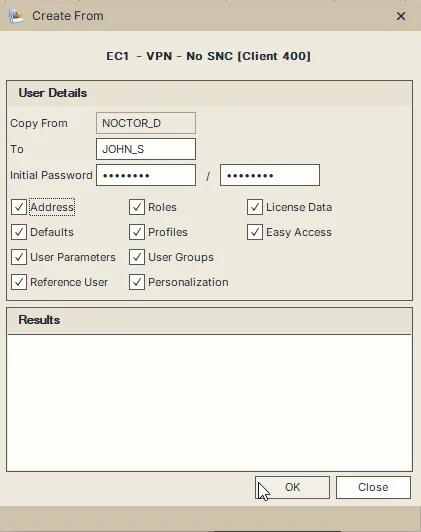
Address is selected in this example. Choose the properties needed for the new account.
Choose what to copy
The source’s logon settings and company are carried over. These include its user type, account validity, logon-data user group, accounting number and time zone.
Address starts cleared. The other copy options start selected.
- Address copies the source’s address and communication details. Select it when those details belong on the new account.
- Defaults copies SAP user defaults, such as display formatting and spool preferences.
- User Parameters copies parameter IDs and their values.
- Reference User copies the source’s reference-user assignment.
- Roles copies the role assignments. In this dialog, it also controls copying authorization profiles. Use Fast Copy when you need independent Roles and Profiles choices.
- User Groups copies the source’s additional group memberships.
- License Data copies the SAP license classification.
Personalization and Easy Access data must be maintained separately for the new account. Their checkboxes do not affect the copy in this version.