 Delorion
Assign SNC names
Assign SAP sign-on identities from user IDs, names or email addresses, and choose how to handle existing SNC assignments.
Applies to userXpress 2.0.0.0
Download PDF
- This pageAssign SNC names
- This sectionUsers
- Full manualuserXpress documentation
On this page
An SNC name links a SAP account to the user’s identity in your single sign-on system. Use SNC Name.. to assign these identities to new accounts or update accounts when your organization’s naming format changes.
Use the SNC name format configured by your SAP administrator. The prefix, capitalization, punctuation and spaces form part of the name.
Assign a name
- In the Global User Table, select the accounts to update.
- Choose Users → Change → Assign → SNC Name... The Assign SNC dialog opens.
- Choose Standard for a prefix, SAP user ID and suffix. Choose Advanced to use names, email addresses, a different capitalization or a fixed name. Both modes are explained below.
- Enter Previous and Following for Standard, or an expression in Literal for Advanced. The sections below give examples.
- Set Only change users without SNC assignment and Permit password logon for SAP GUI as described below.
- Read Example to see the generated name for the first selected account. userXpress uses each account’s own details when applying the expression.
- Choose OK. If the productive-client confirmation appears, choose Yes to apply the change there or No to cancel.
The progress window closes when processing finishes. userXpress refreshes the affected accounts in the Global User Table. Choose Close in Assign SNC to leave without applying the entered values.
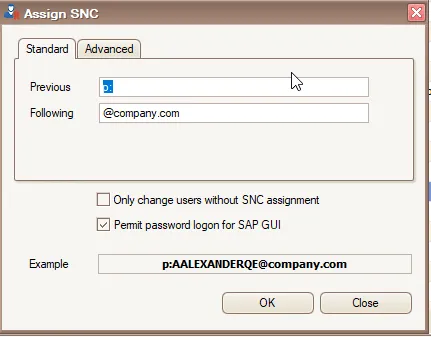
Standard: use the SAP user ID
Use Standard when the SNC name contains the SAP user ID exactly as it appears in the Global User Table.
- In Previous, enter the text before the user ID.
- In Following, enter the text after the user ID.
For example, Previous p: and Following @example.com produce p:SMITH_J@example.com for user SMITH_J.
You can leave either field empty. Leaving both fields empty removes the SNC name. To use only the user ID, choose Advanced and enter $USER instead.
Advanced: build a name from account details
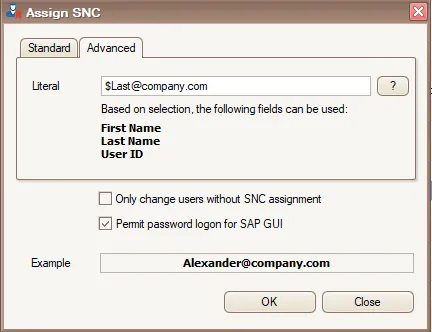
Use Advanced when the name contains an email address, combines name parts or requires a particular capitalization.
Enter the expression in Literal. Combine variables with the fixed text required by your naming format. For example, p:$first.$last@example.com produces p:john.smith@example.com for John Smith.
The field list under Literal shows which attributes are present for every selected account. Use those attributes in your expression. Email expressions also require a first name for every selected account.
For a single account, you can enter its complete SNC name as fixed text in Literal. Fixed text is assigned unchanged to every selected account, so select that account alone.
The ? button opens the variable reference in your browser.
Existing assignments and password logon
Only change users without SNC assignment
Select this option when adding SNC names to accounts that do not yet have one. Accounts with an existing SNC name are skipped, preserving both their name and password-logon setting.
The option is clear by default. Leave it clear when you want to replace existing names or remove assignments.
Permit password logon for SAP GUI
This option is selected by default in userXpress. It sets the account’s permission to use a SAP user ID and password in addition to SNC sign-on. Clear it when the account should use SNC sign-on only.
SAP applies this per-user choice when SNC is enabled and password logon is controlled per user: snc/enable = 1 and snc/accept_insecure_gui = U. See SAP’s SNC user settings for the relationship with the system settings.
Variable reference
Variable names are case-sensitive. Use one casing variant per attribute in an expression.
For each attribute, the variants below produce uppercase, initial-capital and lowercase values, in that order.
| Attribute | Variables |
|---|---|
| First name | $FIRST, $First, $first |
| Last name | $LAST, $Last, $last |
$EMAIL, $Email, $email |
|
| User ID | $USER, $User, $user |
Initial capital uppercases the first character and lowercases the rest. For example, $Last changes McDonald to Mcdonald. Choose the variant required by the sign-on identity.
Examples
For user ID SMITH_J, first name John, last name Smith and email john.smith@example.com:
$First.$Last@example.combecomesJohn.Smith@example.com.p:$user@sales.example.combecomesp:smith_j@sales.example.com.p:$emailbecomesp:john.smith@example.com.p:CN=$user, O=example, C=USbecomesp:CN=smith_j, O=example, C=US.
Remove SNC names
- Select the accounts and open Users → Change → Assign → SNC Name...
- On Standard, empty both Previous and Following. Example becomes empty.
- Clear Only change users without SNC assignment so accounts with names are included.
- Set Permit password logon for SAP GUI for those accounts, then choose OK.
This clears the SNC identity from each selected account and applies the password-logon choice.
Read the results
Select one account in the Global User Table, right-click its row and choose Full Message to read its SAP messages. Point to a text cell in a marked row to read its error or warning.
SNC already set. Skipped change (Skip user flag set). means the account was preserved by Only change users without SNC assignment.
Accounts are processed separately. If one fails, successful changes to other accounts remain applied. Follow the account’s message to resolve the cause and select the affected accounts for another attempt. If a display-refresh error is reported, use Refresh to retrieve the account values before repeating the assignment.
To stop processing, close the progress window. userXpress finishes active work and reports how many users were not started. Completed changes remain applied.
If a variable is unavailable
- If an attribute is missing from the list under Literal, update the affected accounts’ name information or email addresses, or select accounts with the required values. Reopen Assign SNC after updating the Global User Table.
- If an email expression reports missing data even though every account has an email address, supply the missing first names or select accounts that have them.
- If Example still contains a variable token, match its spelling and capitalization to the reference above. Use only one variant of each attribute, such as
$firstrather than both$firstand$FIRSTin the same expression.