 Delorion
Message and log off users
Send a message to online SAP users or close their sessions from the Global User Table.
Applies to userXpress 2.0.0.0
Download PDF
- This pageMessage and log off users
- This sectionUsers
- Full manualuserXpress documentation
On this page
Use Users → Interact in the Global User Table to contact users in SAP or end their sessions.
Send Message is useful before planned maintenance or when a user needs to release work in SAP. Log User Off closes sessions that must be ended, for example when a user has left a session open.
Find online users
The Online column identifies users with SAP sessions when their information was last retrieved. To update it, select the relevant accounts and choose Users → Refresh.
Filter Online to show online accounts, then select the recipients or users you want to log off. Each row identifies an account in a system and client. See Find and select users for column filters and selection.
Send a message
- Select the online accounts in the Global User Table.
- Choose Users → Interact → Send Message.
- In Send terminal message, enter the text under Enter message. Keep it within 128 characters. Characters left shows the remaining space.
- Choose OK to send the message to their SAP sessions.
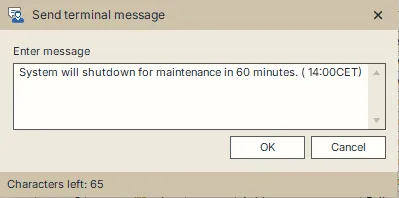
For example: “Maintenance starts at 18:00. Please save your work and log off before then.”
userXpress sends to selected accounts marked online in the table. When a user has just logged on, refresh their row before sending.
A delivery error marks the affected row. Point to a text cell in the row to read the error tooltip. Refresh that account’s online status before sending again.
Log users off
Logging off ends the selected users’ SAP sessions, including sessions on other application servers in the system. Unsaved work in those sessions can be lost. Send a message first when users need time to save their work.
- Select the accounts in the Global User Table.
- Choose Users → Interact → Log User Off.
- Choose Yes in Log User Off to end their sessions, or No to cancel.
The status bar reports completed logoffs, and userXpress refreshes the affected accounts. An error marks the relevant row. Point to a text cell in that row to read its message.
To prevent a user from logging on again, lock the account.