 Delorion
Manage parameter IDs
Set SAP user defaults for selected accounts, keeping, overwriting or removing their existing parameter values.
Applies to userXpress 2.0.0.0
Download PDF
- This pageManage parameter IDs
- This sectionUsers
- Full manualuserXpress documentation
On this page
Parameter IDs store user-specific defaults that SAP transactions can use to fill fields. Use Parameter ID to apply the same defaults to several accounts, update an existing default or remove one that users no longer need.
You prepare one list of parameter IDs and values. userXpress applies it to every selected account, using the update option you choose for each account’s existing parameters.
Prepare the change
- In the Global User Table, select the accounts to change.
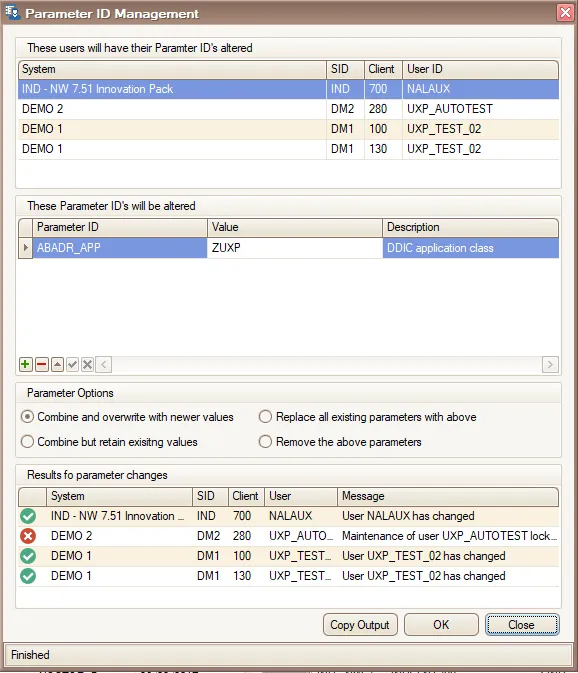
- Choose Users → Change → Assign → Parameter ID. Parameter ID Management opens with the selected users and their systems and clients in the upper list.
- Wait for the parameter catalogue to load. OK becomes available when loading finishes.
- Choose + below the parameter list to add a row. In Parameter ID, open the dropdown and choose the ID. Its Description appears beside it.
- Enter the default in Value. Repeat for each parameter, listing each ID once. For Remove the above parameters, choose the IDs to remove and leave Value empty.
- Under Parameter Options, choose how to handle existing parameters. The options are explained below. Combine and overwrite with newer values is selected by default.
- Choose OK to apply the list to all accounts shown in the upper list. The result list fills with messages for each processed account.
The parameter dropdown uses catalogues loaded from the selected SAP clients.
Use − to remove an unwanted row from your proposed list before applying it. To change the target accounts, choose Close, select the accounts in the Global User Table and open Parameter ID again.
Choose how existing parameters are handled
Combine and overwrite with newer values
Use this option to set a common value for the listed IDs. userXpress adds missing IDs and replaces the values of IDs already assigned to each account. Other parameters keep their existing values.
For example, if an account has Z_DEMO=A and your list contains Z_DEMO=B, the account receives Z_DEMO=B.
Combine but retain exisitng values
Use this option to supply defaults where they are missing while keeping each user’s existing choices. userXpress adds IDs that the account does not have. An existing ID keeps its value.
With the same example, the account keeps Z_DEMO=A. An account without Z_DEMO receives Z_DEMO=B.
The examples use an illustrative ID. Choose the actual ID and value required by your SAP transactions.
Replace all existing parameters with above
Use this option when every selected account needs the complete parameter list you have prepared. userXpress replaces each account’s parameters with that list.
Include every parameter you want to keep before choosing OK. Unlisted parameters are removed. An empty list clears all parameters from the selected accounts.
Remove the above parameters
Use this option to withdraw particular defaults. userXpress removes the listed IDs from each account and keeps its other parameters. Removal matches the Parameter ID, regardless of its assigned value.
Read the results
The lower list identifies each account by System, SID, Client and User. Message contains SAP’s response or the error that prevented processing. Results from further OK runs are added to the same list.
The status bar shows Parameter changes finished. when processing completes without reported errors. Parameter changes finished with client errors. means that some assignments failed. Successful changes to other accounts remain applied.
Use Copy Output to copy the entire result list to the clipboard. For a failed account, use its message to resolve the cause, then reopen Parameter ID with that account selected.
Stop a running change
Choose Close to stop further assignments. userXpress waits for active work to finish, then closes the window. Completed changes remain applied. To keep the result list available for Copy Output, let processing finish before closing the window.