 Delorion
Create users
Create an account in several clients, assign its details and roles, or create a numbered series from a source account.
Applies to userXpress 2.0.0.0
Download PDF
- This pageCreate users
- This sectionUsers
- Full manualuserXpress documentation
Choose Create User when you want to enter a new account’s details and create it in one or more connected clients. For example, create a new colleague’s account across their SAP systems with shared contact details and different roles in each client.
Choose Create Ranged User.. for a numbered series, such as training accounts. Each account in the series inherits settings and assignments from a source account in one client.
To choose which properties to inherit from an existing account, use Create From for one client or Fast Copy for several clients. For a list of different new accounts, use account-list creation or Mass User Create.
Create an account in selected clients
- Select a row in the Global User Table to make the creation command available.
- Choose Users → Change → Create → Create User.
- On Select Systems, select the clients in which to create the account.
- Choose Get Common Data. userXpress loads the available groups, roles, reference users and other choices for those clients.
- Enter User ID, the password in both Password fields, and the first and last name under Name. The user ID can contain up to 12 characters.
- Choose User Type. The default is Dialog. Fill in the additional details and role assignments needed for the account.
- Choose Create User.
The selected clients in Select Systems determine where the account is created. The row selected in the Global User Table only opens the command.
The Comment column reports progress for each client. Results contains the individual creation and assignment messages. New accounts are added to the Global User Table.
Account details
The same account details apply in each selected client. Role rows can have their own client scope.
- Name, Email and Alias identify the person and their contact or alternative logon details. If you leave the last name empty, userXpress uses the new user ID.
- Validty Dates sets the period in which the account is valid. Enter the start and end dates for a temporary account. The start date must be on or before the end date.
- User Group sets the account’s logon-data user group. Accounting and Enter Cost Center supply the account and cost-center values used for allocation.
- SNC Name supplies the account’s SNC identity. Under Defaults → SNC, Permit Password-Logon with SAP Gui controls password logon alongside SNC.
- Address contains work location, telephone, mobile, fax and company details. Choose the Company to associate with the account. Enter telephone, mobile and fax numbers as digits, with their country and extension values in the separate controls.
- Defaults sets date, time and number formatting, time zone and printing preferences. Print Immediately sends output to the selected Output Device immediately. Delete After Output removes the spool request after output.
- Defaults → CATT → Test Status enables test-status assignment for SAP CATT procedures. Use it for accounts that record those results. SAP’s CATT authorization guidance explains the required authorization.
- Defaults → Security Policy assigns a policy offered for the selected clients. The field displays Not supported for your selected system(s) when a selected system does not support this assignment.
- Parameters sets default values used by SAP transactions. Add a row for each Parameter ID and Value. The Description identifies the parameter.
- Groups adds user-group memberships. Select each group in a separate User Group row. These memberships are separate from the single User Group in the account’s logon data.
- Licenses → Contractual User Type assigns the SAP license classification for the account.
Get Common Data limits shared choices to values available across the selected clients. If the value you need belongs to only some clients, create those accounts as a separate selection.
When you change the system selection after loading common data, choose Yes in Selection Change. Select the new clients and choose Get Common Data again before creating the account.
Assign roles during creation
Use Roles to give the account common assignments and additional assignments in particular clients.
- Open Roles and start an empty row.
- In System, choose the assignment’s scope:
- Choose *ALL* for a role that is available in every selected client.
- Choose a specific system, then choose its Client, for a client-specific assignment.
- Select Role Name. Its Description appears in the row.
- Set Valid From and Valid To. Selecting a role fills these with today and 31 December 9999.
- Add another row for each additional role.
For example, assign Z_TRAINING_BASE to *ALL* and add Z_TRAINING_REPORTS for client 200. The account receives both roles in client 200 and only the base role in the other selected clients.
Use Reference User on the same tab when the account should inherit authorizations from a reference user available in the selected clients.
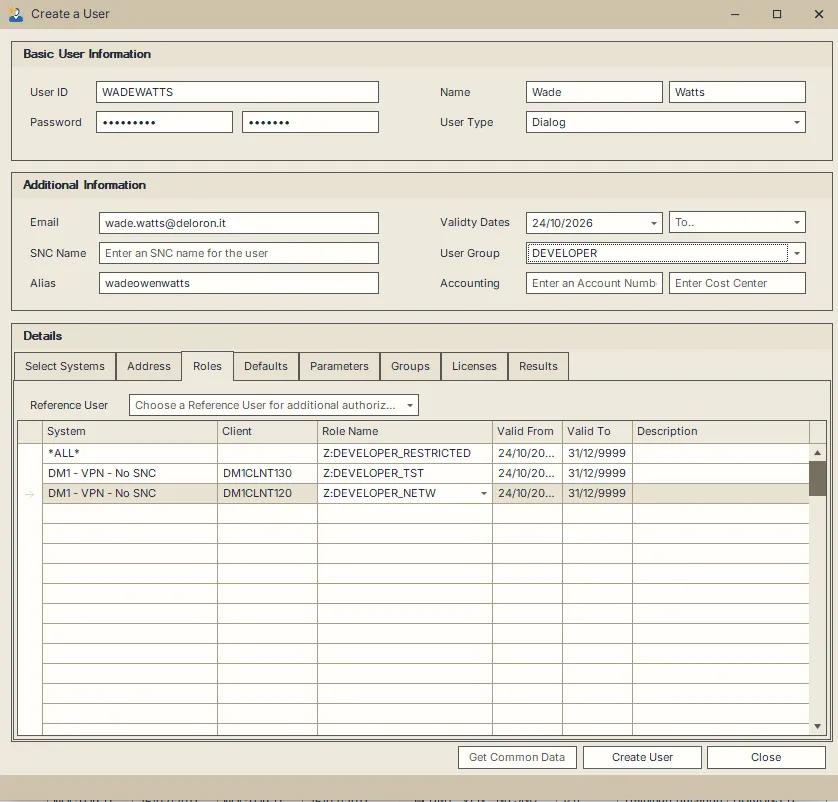
The first role applies to all selected clients. The other two rows add assignments for individual clients.
Creation results
A client can succeed while another fails. Each client has its own Comment, and Results identifies the associated messages.
- The user … already exists means that client was skipped. Use the change-user procedures to update an existing account.
- An alias conflict creates a result message and removes the alias from the creation request. The alias is also omitted from subsequent clients in that run. Assign the intended alias afterwards to the affected accounts.
- An account can be created while a role assignment fails. Assign the missing roles to that existing account after resolving the reported error.
To stop a running creation, choose Close, then Yes in the confirmation. The active client finishes before the remaining clients are cancelled. Accounts already created remain available.
Create a numbered range
Use this command to create accounts such as TRAIN_01 through TRAIN_12 in one client.
- Select one account in the target client in the Global User Table.
- Choose Users → Change → Create → Create Ranged User... The dialog shows the target system and client.
- In User ID, enter a pattern containing
[], such asTRAIN_[]. - Set Number of users to create to 12. The sequence starts at 1 and ends at this number.
- Select Use leading zeroes to obtain
TRAIN_01throughTRAIN_12. Leave it cleared forTRAIN_1throughTRAIN_12. Keep each complete ID within 12 characters. - Under Create from, choose the source account in that client.
- Enter the password twice under Enter Initial Password. Select Password is productive when the new accounts should use it without an initial-password change at first logon.
- Choose OK.
The example beneath User ID shows the naming pattern before creation. With leading zeroes, the width follows the number of accounts: 100 accounts produces numbers 001 through 100.
The series copies the source’s logon settings, company, defaults, parameters, reference user, role/profile assignments, groups and license data. All new accounts use the entered password. Their last name is the source user ID. Use Fast Copy when new accounts need individual names or a different selection of copied properties.
Results lists each User and Message. Existing IDs are skipped. A creation message can be followed by an assignment or password error for the same account. Resolve that reported step for the existing account instead of creating it again.
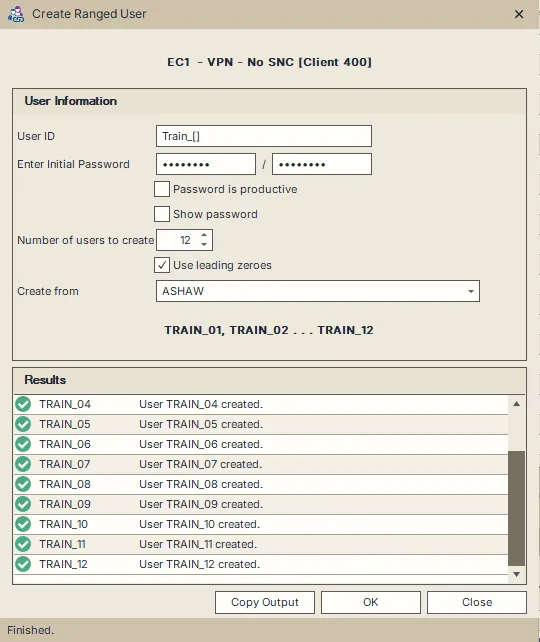
The completed run shows the TRAIN_01 through TRAIN_12 naming example and the account-creation messages.
Choose Copy Output to copy the results to the clipboard. To stop the run, choose Close. The active account finishes before creation stops, and accounts already created remain available.